SureSync allows you to create multiple Group Folders to help organize your Relations, Schedules, and Real-Time Monitors. Each Group Folder contains subfolders for Relations, Schedules, and Real-Time Monitors. For example, you might create a Group Folder for each department or geographical office location in your company which uses SureSync to synchronize files. This powerful feature makes organizing a large number of synchronization jobs easier.
Creating Group Folders
To create a new Group Folder go to File | New | Group Folderor right click in the left pane of the desktop and go to New | Group Folder. This will create a new Group Folder in the tree. You can rename this Group Folder by clicking on the Group Folder and then changing the name in the Group Folder field on the right pane of the desktop. Once the Group Folder has been created you can add SureSync objects to it by using a simple drag and drop.
Security
One of the important features of a Group Folder is that has security settings which are inherited by any Relation, Schedule, and/or Real-Time Monitor that is placed in the Group Folder. By default all SureSync objects will inherit permissions from their parent Group Folder.
A Relation, Schedule, or Real-Time Monitor can only exist under a single Group Folder. There is no way to have the same Relation, Schedule or Real-Time Monitor appear in multiple Group Folders. When you drag and drop between Group Folders, a move operation is performed.
For example, assume that your Technical Support and Information Technology departments both use SureSync to synchronize files. You could create two Group Folders, one for each department, and setup permissions so only personnel from each department can access the SureSync jobs they should have access to.
It is recommended to specify security on Group Folders and allow inheritance to apply the permissions to your SureSync jobs instead of applying security to individual jobs whenever possible. This simplifies management of security settings within SureSync and allows you to easily update security settings for many objects at once.

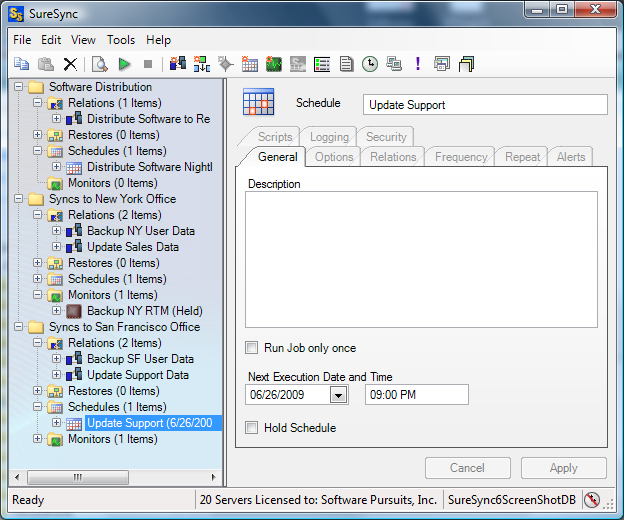
 A Relation, Schedule, or Real-Time Monitor can only exist under a single Group Folder. There is no way to have the same Relation, Schedule or Real-Time Monitor appear in multiple Group Folders. When you drag and drop between Group Folders, a move operation is performed.
 It is recommended to specify security on Group Folders and allow inheritance to apply the permissions to your SureSync jobs instead of applying security to individual jobs whenever possible. This simplifies management of security settings within SureSync and allows you to easily update security settings for many objects at once.